
 Wayne
WayneSwift package manager plugins 是一個讓我們可以在編譯時期,自定義一些動作,以滿足更複雜的編譯需求,如 code generation。本文章將介紹兩種 plugins 並提供完整的範例。
Table of Contents
Swift Package Manager Plugins
Swift package manager plugins 讓我們在編譯時,可以執行一些自定義的動作,如 code generation。它提供兩種 plugins,分別是 build tool plugins 和 command plugins。其中 build tool plugins 又有 build commands 和 prebuild commands 兩種。
在 Package.swift 的 targets 裡,我們需要用 .plugin() 來宣告我們的 plugin。如果我們沒有指定 plugin 程式碼路徑的話,其預設為在 Plugins/ 資料夾下,與 plugin 名稱相同的資料夾。target 必須要在它的 plugins: 參數中列出會使用到的 plugins。
如下程式碼中,我們宣告一個 plugin 叫 SwiftGenPlugin。而,它的程式碼會在 Plugins/SwiftGenPlugin/ 資料夾下。另外,我們還宣告一個 target 叫 SwiftPluginExample。然後,它會使用到 SwiftGenPlugin。
// swift-tools-version: 5.9
// The swift-tools-version declares the minimum version of Swift required to build this package.

import PackageDescription

let package = Package(
    name: "SwiftPluginExample",
    platforms: [.iOS(.v13)],
    products: [
        .library(name: "SwiftPluginExample", targets: ["SwiftPluginExample"]),
    ],
    targets: [
        .target(
            name: "SwiftPluginExample",
            plugins: [
                .plugin(name: "SwiftGenPlugin"),
            ]
        ),

        .plugin(
            name: "SwiftGenPlugin",
            capability: .buildTool()
        ),
    ]
)
我們也可以讓其他的 package 使用我們的 plugins。我們只要在 products 中,用 .plugin() 來 export 我們的 plugins,如下。
// swift-tools-version: 5.9
// The swift-tools-version declares the minimum version of Swift required to build this package.

import PackageDescription

let package = Package(
    name: "SwiftPluginExample",
    platforms: [.iOS(.v13)],
    products: [
        ...
        .plugin(name: "SwiftGenPlugin", targets: ["SwiftGenPlugin"]),
    ],
    targets: [
        ...
        .plugin(
            name: "SwiftGenPlugin",
            capability: .buildTool()
        ),
    ]
)
Build Tool Plugins
所有的 build tool plugins 都必須要實作 protocol BuildToolPlugin。在 BuildToolPlugin.createBuildCommands() 中,我們要回傳一個或數個 commands。Swift package manager 會在 package resolution 和 validation 之後,執行 build tool plugins 以取得它們回傳的 commands。然後,根據 commands 提供的訊息,在 build time 時決定是否執行該 commands。
該注意的是,我們在 createBuildCommands() 中,只回傳 commands。真正的動作都會實作在 commands 裡面。而且,這些 commands 都必須是用 .binaryTarget() 或 .executableTarget() 宣告在 Package.swift 裡的 targets。
import PackagePlugin

@main struct SwiftGenPlugin: BuildToolPlugin {
    func createBuildCommands(context: PluginContext, target: Target) async throws -> [Command] {
        return [
            ...
        ]
    }
}
Build Commands
我們可以用 Command.buildCommand() 來建立一個 build command。Swift package manager 會依據 inputFiles 參數來決定是否需要執行該 command。也會根據 outputFiles 參數來決定何時需要執行該 command。outputFiles 中所列出的檔案,也會被編譯。
extension Command {
    /// Creates a command to run during the build. The executable should be a
    /// tool returned by `PluginContext.tool(named:)`, and any paths in the
    /// arguments list as well as in the input and output lists should be
    /// based on the paths provided in the target build context structure.
    ///
    /// The build command will run whenever its outputs are missing or if its
    /// inputs have changed since the command was last run. In other words,
    /// it is incorporated into the build command graph.
    ///
    /// This is the preferred kind of command to create when the outputs that
    /// will be generated are known ahead of time.
    ///
    /// - parameters:
    ///   - displayName: An optional string to show in build logs and other
    ///     status areas.
    ///   - executable: The executable to be invoked; should be a tool looked
    ///     up using `tool(named:)`, which may reference either a tool provided
    ///     by a binary target or build from source.
    ///   - arguments: Arguments to be passed to the tool. Any paths should be
    ///     based on the paths provided in the target build context.
    ///   - environment: Any custom environment assignments for the subprocess.
    ///   - inputFiles: Input files to the build command. Any changes to the
    ///     input files cause the command to be rerun.
    ///   - outputFiles: Output files that should be processed further according
    ///     to the rules defined by the build system.
    public static func buildCommand(displayName: String?, executable: PackagePlugin.Path, arguments: [CustomStringConvertible], environment: [String : CustomStringConvertible] = [:], inputFiles: [PackagePlugin.Path] = [], outputFiles: [PackagePlugin.Path] = []) -> PackagePlugin.Command
}
範例:Custom Code Generator
現在讓我們來用 build command 實作一個 code generator。在以下的 Package.swift 中,我們宣告一個 SwiftPluginExample,而它會使用到 VersionGenPlugin。而,真正產生 version 的程式碼是實作在 vensiongen 裡。
// swift-tools-version: 5.9
// The swift-tools-version declares the minimum version of Swift required to build this package.

import PackageDescription

let package = Package(
    name: "SwiftPluginExample",
    platforms: [.iOS(.v13)],
    products: [
        .library(name: "SwiftPluginExample", targets: ["SwiftPluginExample"]),
    ],
    dependencies: [
        .package(url: "https://github.com/apple/swift-argument-parser", from: "1.3.0"),
    ],
    targets: [
        .target(
            name: "SwiftPluginExample",
            plugins: [
                .plugin(name: "VersionGenPlugin"),
            ]
        ),

        .plugin(
            name: "VersionGenPlugin",
            capability: .buildTool(),
            dependencies: ["versiongen"]
        ),
        .executableTarget(
            name: "versiongen",
            dependencies: [
                .product(name: "ArgumentParser", package: "swift-argument-parser"),
            ]
        ),
    ]
)
import Foundation
import ArgumentParser
@main
struct VersionGen: ParsableCommand {
enum Errors: Error {
case inputPathMissing
case outputPathMissing
case inputFileNotFound
case illegalInputFile
}
@Option(name: .shortAndLong, help: "The path of the version input xcconfig file")
var input: String? = nil
@Option(name: .shortAndLong, help: "The path of the version output source file")
var output: String? = nil
mutating func run() throws {
guard let inputPath = input else {
throw Errors.inputPathMissing
}
guard let outputPath = output else {
throw Errors.outputPathMissing
}
guard FileManager.default.fileExists(atPath: inputPath) else {
throw Errors.inputFileNotFound
}
let inputContent = try String(contentsOfFile: inputPath, encoding: .utf8)
let inputLines = inputContent.components(separatedBy: .newlines)
var version = ""
for line in inputLines {
let str = line.trimmingCharacters(in: .whitespacesAndNewlines)
if str.hasPrefix("VERSION") {
let parts = str.components(separatedBy: "=")
if parts.count == 2 {
version = parts[1].trimmingCharacters(in: .whitespacesAndNewlines)
}
}
}
guard version != "" else {
throw Errors.illegalInputFile
}
if FileManager.default.fileExists(atPath: outputPath) {
try FileManager.default.removeItem(atPath: outputPath)
}
try """
struct Version {
static let version = "\(version)"
}
""".write(toFile: outputPath, atomically: true, encoding: .utf8)
}
}// Version.xcconfig VERSION = 2.0.0
import PackagePlugin

@main
struct VersionGenPlugin: BuildToolPlugin {
    func createBuildCommands(context: PluginContext, target: Target) async throws -> [Command] {
        let versionConfig = context.package.directory.appending("Version.xcconfig")
        let versionSource = context.pluginWorkDirectory.appending("Version.swift")

        return [.buildCommand(
            displayName: "VersionGen plugin",
            executable: try context.tool(named: "versiongen").path,
            arguments: [
                "--input", "\(versionConfig)",
                "--output", "\(versionSource)",
            ],
            inputFiles: [versionConfig],
            outputFiles: [versionSource]
        )]
    }
}
import UIKit
class HelloWorldViewController: UIViewController {
override func viewDidLoad() {
super.viewDidLoad()
let label = UILabel()
label.text = "Version is \(Version.version)"
}
}Prebuild Commands
我們可以使用 Command.prebuildCommand() 來建立一個 prebuild command。Swift package manager 會在每一次開始 build 之前,先執行 prebuild commands。然後,Swift package manager 在編譯時,也會編譯 outputFilesDirectory 參數指定的資料夾下的檔案。
extension Command {
    /// Creates a command to run before the build. The executable should be a
    /// tool returned by `PluginContext.tool(named:)`, and any paths in the
    /// arguments list and in the output files directory should be based on
    /// the paths provided in the target build context structure.
    ///
    /// The build command will run before the build starts, and is allowed to
    /// create an arbitrary set of output files based on the contents of the
    /// inputs.
    ///
    /// Because prebuild commands are run on every build, they can have a
    /// significant performance impact and should only be used when there is
    /// no way to know the names of the outputs before the command is run.
    ///
    /// The `outputFilesDirectory` parameter is the path of a directory into
    /// which the command will write its output files. Any files that are in
    /// that directory after the prebuild command finishes will be interpreted
    /// according to the same build rules as for sources.
    ///
    /// - parameters:
    ///   - displayName: An optional string to show in build logs and other
    ///     status areas.
    ///   - executable: The executable to be invoked; should be a tool looked
    ///     up using `tool(named:)`, which may reference either a tool provided
    ///     by a binary target or build from source.
    ///   - arguments: Arguments to be passed to the tool. Any paths should be
    ///     based on the paths provided in the target build context.
    ///   - environment: Any custom environment assignments for the subprocess.
    ///   - outputFilesDirectory: A directory into which the command can write
    ///     output files that should be processed further.
    public static func prebuildCommand(displayName: String?, executable: PackagePlugin.Path, arguments: [CustomStringConvertible], environment: [String : CustomStringConvertible] = [:], outputFilesDirectory: PackagePlugin.Path) -> PackagePlugin.Command
}
範例:SwiftGen Code Generator
SwiftGen 一個用來將專案裡的 assets、storyboards 等檔案,產生對應的程式碼。
// swift-tools-version: 5.9
// The swift-tools-version declares the minimum version of Swift required to build this package.

import PackageDescription

let package = Package(
    name: "SwiftPluginExample",
    platforms: [.iOS(.v13)],
    products: [
        .library(name: "SwiftPluginExample", targets: ["SwiftPluginExample"]),
    ],
    targets: [
        .target(
            name: "SwiftPluginExample",
            plugins: [
                .plugin(name: "SwiftGenPlugin"),
            ]
        ),

        .plugin(
            name: "SwiftGenPlugin",
            capability: .buildTool(),
            dependencies: ["swiftgen"]
        ),
        .binaryTarget(
            name: "swiftgen",
            url: "https://github.com/SwiftGen/SwiftGen/releases/download/6.6.2/swiftgen-6.6.2.artifactbundle.zip",
            checksum: "7586363e24edcf18c2da3ef90f379e9559c1453f48ef5e8fbc0b818fbbc3a045"
        ),
    ]
)
input_dir: ${TARGET_DIR}
output_dir: ${DERIVED_SOURCES_DIR}
xcassets:
inputs:
- Colors.xcassets
outputs:
templateName: swift5
output: Colors.swiftimport PackagePlugin
@main
struct SwiftGenPlugin: BuildToolPlugin {
func createBuildCommands(context: PluginContext, target: Target) async throws -> [Command] {
let configPath = context.package.directory.appending("ColorGen.yml")
return [.prebuildCommand(
displayName: "SwiftGen plugin",
executable: try context.tool(named: "swiftgen").path,
arguments: [
"config",
"run",
"--verbose",
"--config", "\(configPath)"
],
environment: [
"TARGET_DIR": target.directory,
"DERIVED_SOURCES_DIR": context.pluginWorkDirectory
],
outputFilesDirectory: context.pluginWorkDirectory
)]
}
}import UIKit
class HelloWorldViewController: UIViewController {
override func viewDidLoad() {
super.viewDidLoad()
let label = UILabel()
label.textColor = Asset.blue.color
}
}Command Plugins
不同於 build tool plugins 是在 build time 時自動被執行,command plugins 是使用者直接執行的 plugins。
使用者可以在 Swift package manager CLI 下執行 command plugins。
% swift package format-source-code
或是,在 Xcode 上直接執行。
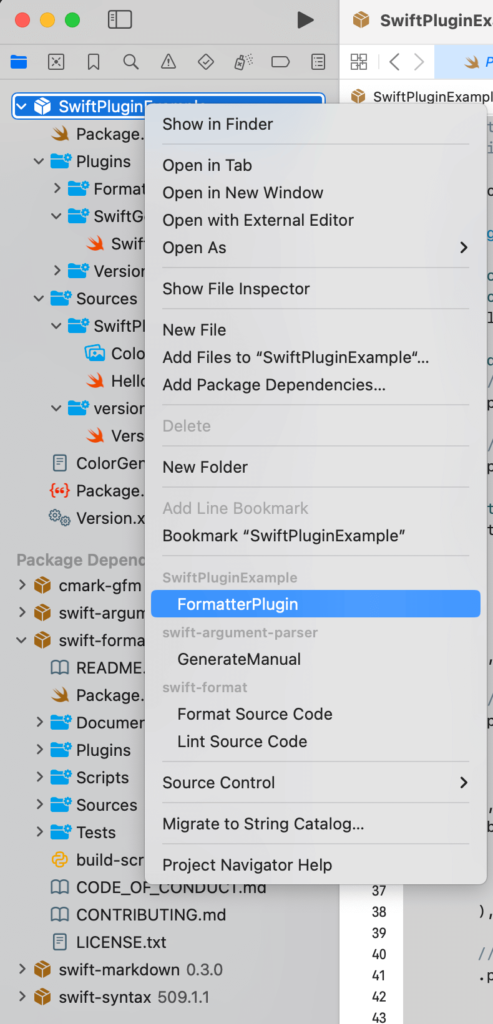
Command Plugins
所有的 command plugins 都必須要實作 protocol CommandPlugin。不同於 BuildToolPlugin.createBuildCommands(),我們在 CommandPlugin.performCommand() 中,直接實作動作。
另外,由於 command plugins 是由使用者直接執行,所有不會有 target 依賴於它們。
import PackagePlugin

@main
struct FormatterPlugin: CommandPlugin {
    func performCommand(context: PluginContext, arguments: [String]) async throws {
        ...
    }
}
範例:Swift-Format Formmattor
swift-format 是一個用來編排 Swift 程式碼。我們可以利用 command plugins 將 swift-format 整合到專案裡面。
// swift-tools-version: 5.9
// The swift-tools-version declares the minimum version of Swift required to build this package.

import PackageDescription

let package = Package(
    name: "SwiftPluginExample",
    platforms: [.iOS(.v13)],
    products: [
        .library(name: "SwiftPluginExample", targets: ["SwiftPluginExample"]),
    ],
    dependencies: [
        .package(url: "https://github.com/apple/swift-format.git", from: "509.0.0"),
    ],
    targets: [
        .plugin(
            name: "FormatterPlugin",
            capability: .command(
                intent: .sourceCodeFormatting(),
                permissions: [
                    .writeToPackageDirectory(reason: "Formatting the source files"),
                ]
            ),
            dependencies: [
                .product(name: "swift-format", package: "swift-format"),
            ]
        )
    ]
)
import PackagePlugin
import Foundation
@main
struct FormatterPlugin: CommandPlugin {
func performCommand(context: PluginContext, arguments: [String]) async throws {
let formatter = try context.tool(named: "swift-format")
let config = context.package.directory.appending(".swift-format.json")
for target in context.package.targets {
guard let target = target as? SourceModuleTarget else { continue }
let exec = URL(fileURLWithPath: formatter.path.string)
let args = [
"--configuration", "\(config)",
"--in-place",
"--recursive",
"\(target.directory)"
]
let process = try Process.run(exec, arguments: args)
process.waitUntilExit()
if process.terminationReason == .exit && process.terminationStatus == 0 {
print("Formatted the source code in \(target.directory)")
} else {
Diagnostics.error("Formmating the source code failed: \(process.terminationReason):\(process.terminationStatus)")
}
}
}
}結語
除了自己撰寫 plugins 之外,現在已經有很多第三方的 plugins。在 Swift package manager plugin 出來之前,這些第三方的工具是以執行檔的方式存在。我們常常會透過 Homebrew 或是 Gem 來將它們安裝至編譯環境。然而,有了 plugins 之後,我們不需要再額外手動安裝這些工具。 Swift package manager 在 package resolution 時,就會自動下載這些工具。這使得編譯的過程,更加簡單方便。
參考
- Getting Started with Plugins, Swift Package Manager.
- SE-0303, Package Manager Extensible Build Tools, Swift Evolution.
- SE-0332, Package Manager Command Plugins, Swift Evolution.


 Wayne
Wayne


