
 Wayne
WayneCompared with Xcode project’s Build Settings, Package.swift is much simpler to use. However, when we convert a Xcode framework project into a Swift package, the XCFramework cannot be built successfully. This article will introduce how to build Swift Package as XCFramework.
The complete code for this chapter can be found in .
Table of Contents
Problem: Xcode does not support building Swift Package as XCFramework
In the following article, we explained how to build a framework project as a XCFramework.

 Wayne
WayneIn the sample code, there is a Greeting Swift package. We use the way introduced in the above article to build Greeting, and the script is as follows.
#!/bin/bash

archiveDir="$(pwd)/archives"
distDir="$(pwd)/dist"
scheme="Greeting"
debugSymbols=1

simulatorArchivePath="$archiveDir/$scheme-simulator"
(cd "$scheme" && xcodebuild archive
  -scheme "$scheme"
  -configuration "Release"
  -destination "generic/platform=iOS Simulator"
  -archivePath "$simulatorArchivePath"
  VALID_ARCHS="i386 x86_64 arm64"
  SKIP_INSTALL=NO
  BUILD_LIBRARY_FOR_DISTRIBUTION=YES) || exit 1

deviceArchivePath="$archiveDir/$scheme-device"
(cd "$scheme" && xcodebuild archive
  -scheme "$scheme"
  -configuration "Release"
  -destination "generic/platform=iOS"
  -archivePath "$deviceArchivePath"
  VALID_ARCHS="i386 x86_64 arm64"
  SKIP_INSTALL=NO
  BUILD_LIBRARY_FOR_DISTRIBUTION=YES) || exit 2

xcframework="$distDir/$scheme.xcframework"
simulatorDebugSymbols=""
deviceDebugSymbols=""
if [ $debugSymbols -eq 1 ]; then
  simulatorDebugSymbols="-debug-symbols $simulatorArchivePath.xcarchive/dSYMs/$scheme.framework.dSYM"
  deviceDebugSymbols="-debug-symbols $deviceArchivePath.xcarchive/dSYMs/$scheme.framework.dSYM"
fi

xcodebuild -create-xcframework
  -framework "$simulatorArchivePath.xcarchive/Products/usr/local/lib/$scheme.framework"
  $simulatorDebugSymbols
  -framework "$deviceArchivePath.xcarchive/Products/usr/local/lib/$scheme.framework"
  $deviceDebugSymbols
  -output "$distDir/$scheme.xcframework"
Finally, the Greeting.xcframework we built is as shown below. We found that it was missing resources, umbrella header, swiftmodule, etc. Therefore, it is not a complete XCFramework. If we include it into an App project, errors will occur during compilation.
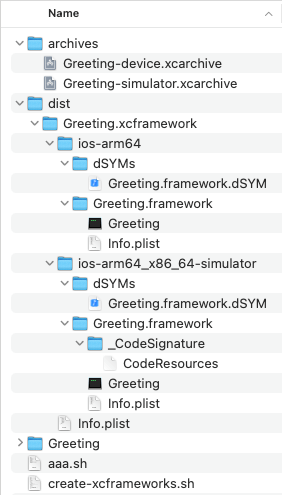
The complete XCFramework should be as follows.

Building Swift Package as XCFramework
In the above explanation, we learned that xcodebuild does not support building Swift package as XCFramework. However, if we look into the derived data generated by xcodebuild during the compilation, we will find that xcodebuild actually generates all the files needed by XCFramework. Therefore, we can use derived data to generate XCFramework.
The following script is modified from build_xcframework_from_swift_package.sh in Building XCFrameworks from a hierarchy of Swift Packages. This script has the following main points:
- To be built as a Swift package of XCFramework, its type must be
.dynamic. - We only need
xcodebuild, notxcodebuild archive. - The scheme is the name of Swift package.
- Copy the umbrella header file.
- Copy all header files in the code.
- Copy the swiftmodule and modulemap files.
- Copy the bundle resource files.
#!/bin/bash

SIMULATOR_SDK="iphonesimulator"
DEVICE_SDK="iphoneos"

PACKAGE="Greeting"
CONFIGURATION="Release"
DEBUG_SYMBOLS="true"

BUILD_DIR="$(pwd)/build"
DIST_DIR="$(pwd)/dist"

build_framework() {
  scheme=$1
  sdk=$2
  if [ "$2" = "$SIMULATOR_SDK" ]; then
    dest="generic/platform=iOS Simulator"
  elif [ "$2" = "$DEVICE_SDK" ]; then
    dest="generic/platform=iOS"
  else
    echo "Unknown SDK $2"
    exit 11
  fi

  echo "Build framework"
  echo "Scheme: $scheme"
  echo "Configuration: $CONFIGURATION"
  echo "SDK: $sdk"
  echo "Destination: $dest"
  echo

  (cd "$PACKAGE" &&
    xcodebuild
      -scheme "$scheme"
      -configuration "$CONFIGURATION"
      -destination "$dest"
      -sdk "$sdk"
      -derivedDataPath "$BUILD_DIR"
      SKIP_INSTALL=NO
      BUILD_LIBRARY_FOR_DISTRIBUTION=YES
      OTHER_SWIFT_FLAGS="-no-verify-emitted-module-interface") || exit 12

  product_path="$BUILD_DIR/Build/Products/$CONFIGURATION-$sdk"
  framework_path="$BUILD_DIR/Build/Products/$CONFIGURATION-$sdk/PackageFrameworks/$scheme.framework"

  # Copy Headers
  headers_path="$framework_path/Headers"
  mkdir "$headers_path"
  cp -pv
    "$BUILD_DIR/Build/Intermediates.noindex/$PACKAGE.build/$CONFIGURATION-$sdk/$scheme.build/Objects-normal/arm64/$scheme-Swift.h"
    "$headers_path/" || exit 13

  # Copy other headers from Sources/
  headers=$(find "$PACKAGE/$scheme" -name "*.h")
  for h in $headers; do
    cp -pv "$h" "$headers_path" || exit 14
  done

  # Copy Modules
  modules_path="$framework_path/Modules"
  mkdir "$modules_path"
  cp -pv
    "$BUILD_DIR/Build/Intermediates.noindex/$PACKAGE.build/$CONFIGURATION-$sdk/$scheme.build/$scheme.modulemap"
    "$modules_path" || exit 15
  mkdir "$modules_path/$scheme.swiftmodule"
  cp -pv "$product_path/$scheme.swiftmodule"/*.* "$modules_path/$scheme.swiftmodule/" || exit 16

  # Copy Bundle
  bundle_dir="$product_path/${PACKAGE}_$scheme.bundle"
  if [ -d "$bundle_dir" ]; then
    cp -prv "$bundle_dir"/* "$framework_path/" || exit 17
  fi
}

create_xcframework() {
  scheme=$1

  echo "Create $scheme.xcframework"

  args=""
  shift 1
  for p in "$@"; do
    args+=" -framework $BUILD_DIR/Build/Products/$CONFIGURATION-$p/PackageFrameworks/$scheme.framework"
    if [ "$DEBUG_SYMBOLS" = "true" ]; then
      args+=" -debug-symbols $BUILD_DIR/Build/Products/$CONFIGURATION-$p/$scheme.framework.dSYM"
    fi
  done

  xcodebuild -create-xcframework $args -output "$DIST_DIR/$scheme.xcframework" || exit 21
}

reset_package_type() {
  (cd "$PACKAGE" && sed -i '' 's/( type: .dynamic,)//g' Package.swift) || exit
}

set_package_type_as_dynamic() {
  (cd "$PACKAGE" && sed -i '' "s/(.library(name: *"$1",)/1 type: .dynamic,/g" Package.swift) || exit
}

echo "**********************************"
echo "******* Build XCFrameworks *******"
echo "**********************************"
echo

rm -rf "$BUILD_DIR"
rm -rf "$DIST_DIR"

reset_package_type

set_package_type_as_dynamic "Greeting"
build_framework "Greeting" "$SIMULATOR_SDK"
build_framework "Greeting" "$DEVICE_SDK"
create_xcframework "Greeting" "$SIMULATOR_SDK" "$DEVICE_SDK"
Module Name of Swift Package
After xcodebuild builds the framework project and Swift package as XCFramework, the module names of the XCFramework will be different.
When building a framework project, the module name of its XCFramework will be the name of the scheme.
When building a Swift package, its XCFramework module name will be [package]_[product]. For the following Package.swift, its module name will be Greeting_GreetingSDK. In the above script, the scheme will be GreetingSDK.
// swift-tools-version: 5.9
// The swift-tools-version declares the minimum version of Swift required to build this package.

import PackageDescription

let package = Package(
    name: "Greeting",
    platforms: [.iOS(.v13)],
    products: [
        .library(name: "GreetingSDK", type: .dynamic, targets: ["Greeting"]),
    ],
    targets: [
        .target(name: "Greeting"),
    ]
)
Therefore, when you want to access resources in a Swift package, use [package]_[product].bundle, as follows.
private var bundle: Bundle {
    get {
        let bundle = Bundle(for: Self.self)
        if let bundleURL = bundle.url(forResource: "Greeting_GreetingSDK",
                                      withExtension: "bundle") {
            return Bundle(url: bundleURL) ?? bundle
        } else {
            return bundle
        }
    }
}
Accessing Storyboard and Xib in Swift Package
When our App project accesses Greeting.storyboard in the sample code, the following errors may occur.
[Storyboard] Unknown class Greeting_Greeting.GreetingViewController in interface Builder file.
To solve this error, we must uncheck Inherit Module From Target in the storyboard and select Greeting in the Module.
This is because the name of GreetingViewController after compilation is Greeting.GreetingViewController. However, its module name is Greeting_Greeting. If Inherit Module From Target is checked in the storyboard, it will think that GreetingViewController is Greeting_Greeting.GreetingViewController, so an error occurs.
![Uncheck [Inherit Module From Target].](https://waynestalk.com/wp-content/uploads/2024/02/uncheck-inherit-module-from-target.png)
Conclusion
Compared to framework projects, Swift packages are a better and simpler way to manage projects. Using the script in this article, we can convert our original framework project into a Swift package.
Reference
- How to build Swift Package as XCFramework, Swift Forums.
- Building XCFrameworks from a hierarchy of Swift Packages, Apple Developer Forums.
- Turn Package.swift file into binary XCFramework, Stack Overflow.
- Can a Swift Package include a table view?, Swift Forums.


