
 Wayne
WayneELF file 是 Linux 使用的檔案格式。不管是要學習 linkers 或是反組譯,都需要了解 ELF file。本文章將介紹 ELF 檔案格式。
Table of Contents
ELF File
ELF(Executable and Linking Format)是一種 object file 格式。有三種主要 object file 型態:
- Relocatable files:它包含 code 和 data。Linkers 鏈結一個 relocatable file 與其他的 object files 來建立一個 executable 或 shared object file。
- Executable files:它包含 program,因此可以被執行。
- Shared object files:它包含 code 和 data。它有兩種使用方式:
- Linker 鏈結一個 shared object file 以及其他的 relocatable files 和 shared object files 來建立另一個 object file。
- Dynamic linker 結合它以及一個 executable file 和其他的 shared objects 來建立一個 process。
由以上的來看,當一個 object file 是 relocatable file 或 shared object file 時,它可以被 linker 存取。當它是 executable file 時,它可以被執行。因此,一個 ELF file 可以由兩種觀點來看,分別是 linking view 和 execution view,如下圖。
Assemblers 和 linkers 是用左邊的 linkable sections 觀點來看一個 ELF file。也就是說,他們對待一個 ELF file 為一個 relocatable 或 shred object file。對於他們來說,一個 ELF file 是由數個 sections 所組成。他們透過 section header table 來存取所有的 sections。
System loaders 是用右邊的 executable segments 觀點來看一個 ELF file。也就是說,他們對待一個 ELF file 為一個 executable 或 shared object file。對於他們來說,一個 ELF file 是由數個 segments 所組成。他們透過 program head table 來存取所有的 segments。
Relocatable files 有 section tables,executable files 有 program header table,而 shared object files 兩者都有。此外,一個 segment 通常由數個 sections 組成。

Data Representation
ELF 支援各種的 processors,因此它有 32-bit 和 64-bit 的版本。所有的欄位都一樣,只是欄位的長度不同。
| Purposes | 32-Bit Name | 32-Bit Size | 32-Bit Alignment | 64-Bit Name | 64-Bit Size | 64-Bit Alignment |
|---|---|---|---|---|---|---|
| Unsigned program address | ELF32_Addr | 4 | 4 | ELF64_Addr | 8 | 8 |
| Unsigned file offset | ELF32_Off | 4 | 4 | ELF64_Off | 8 | 8 |
| Unsigned medium integer | ELF32_Half | 2 | 2 | ELF64_Half | 2 | 2 |
| Unsigned integer | ELF32_Word | 4 | 4 | ELF64_Word | 4 | 4 |
| Signed integer | ELF32_Sword | 4 | 4 | ELF64_Sword | 4 | 4 |
| Unsigned long integer | ELF64_Xword | 8 | 8 | |||
| Signed long integer | ELF64_Sxword | 8 | 8 | |||
| Unsigned small integer | unsigned char | 1 | 1 | unsigned char | 1 | 1 |
ELF Header
我們可以在 /usr/include/elf.h 中,找到 ELF header 的定義。
#define EI_NIDENT (16)

typedef struct
{
  unsigned char	e_ident[EI_NIDENT];	/* Magic number and other info */
  Elf32_Half	e_type;			/* Object file type */
  Elf32_Half	e_machine;		/* Architecture */
  Elf32_Word	e_version;		/* Object file version */
  Elf32_Addr	e_entry;		/* Entry point virtual address */
  Elf32_Off	e_phoff;		/* Program header table file offset */
  Elf32_Off	e_shoff;		/* Section header table file offset */
  Elf32_Word	e_flags;		/* Processor-specific flags */
  Elf32_Half	e_ehsize;		/* ELF header size in bytes */
  Elf32_Half	e_phentsize;		/* Program header table entry size */
  Elf32_Half	e_phnum;		/* Program header table entry count */
  Elf32_Half	e_shentsize;		/* Section header table entry size */
  Elf32_Half	e_shnum;		/* Section header table entry count */
  Elf32_Half	e_shstrndx;		/* Section header string table index */
} Elf32_Ehdr;

typedef struct
{
  unsigned char	e_ident[EI_NIDENT];	/* Magic number and other info */
  Elf64_Half	e_type;			/* Object file type */
  Elf64_Half	e_machine;		/* Architecture */
  Elf64_Word	e_version;		/* Object file version */
  Elf64_Addr	e_entry;		/* Entry point virtual address */
  Elf64_Off	e_phoff;		/* Program header table file offset */
  Elf64_Off	e_shoff;		/* Section header table file offset */
  Elf64_Word	e_flags;		/* Processor-specific flags */
  Elf64_Half	e_ehsize;		/* ELF header size in bytes */
  Elf64_Half	e_phentsize;		/* Program header table entry size */
  Elf64_Half	e_phnum;		/* Program header table entry count */
  Elf64_Half	e_shentsize;		/* Section header table entry size */
  Elf64_Half	e_shnum;		/* Section header table entry count */
  Elf64_Half	e_shstrndx;		/* Section header string table index */
} Elf64_Ehdr;
我們將簡單地介紹每一個欄位,詳細的說明請參照 ELF Header。
| Fields | Descriptions |
|---|---|
| e_ident | 參照 e_ident。 |
| e_type | Object file type。ET_REL: 1 => Relocatable fileET_EXEC: 2 => Executable fileET_DYN: 3 => Shared object fileET_CORE: 4 => Core file |
| e_machine | 要求的 architecture。 ex: EM_386: 3 |
| e_version | Object file 版本。EV_CURRENT: 1 |
| e_entry | 如果此 file 是 executable file,這是 entry point 的 virtual address。否則,此為 0。 |
| e_phoff | Program header table 在檔案中的 offset。如果此檔案沒有 program header table,此為 0。 |
| e_shoff | Section header table 在檔案中的 offset。如果此檔案沒有 section header table,此為 0。 |
| e_flags | Processor-specific flags。 |
| e_ehsize | ELF header 的大小。 |
| e_phentsize | Program header table 的一個 entry 的大小。所有的 entries 都是相同的大小。 |
| e_phnum | Program header table 擁有的 entries 的個數。假如此檔案沒有 program header table,此為 0。 Program header table 的總大小為 e_phentsize * e_phnum bytes。 |
| e_shentsize | Section header table 的一個 entry 的大小。所有的 entries 都是相同的大小。 |
| e_shnum | Section header table 擁有的 entries 的個數。假如此檔案沒有 section header table,此為 0。 Section header table 的總大小為 e_shentsize * e_shnum bytes。 |
| e_shstrndx | 在 Section header table 裡,包含 section name 的 string table 的 index。 |
e_ident
e_ident 總共 16 bytes,其詳情可參照 ELF Identification。
| Fields | Bytes | Descriptions |
|---|---|---|
| EI_MAG | 4 | 檔案識別碼。 Magic number:7f 45 4c 46 => 7f E L F。 |
| EI_CLASS | 1 | 檔案的 class。ELFCLASS32: 1 => 32-bit objectsELFCLASS64: 2 => 64-bite object |
| EI_DATA | 1 | 資料編碼。ELFDATA2LSB: 1 => 2’s complement, little endianELFDATA2MSB: 2 => 2’s complement, big endian |
| EI_VERSION | 1 | ELF header 的版本。 |
| EI_OSABI | 1 | 特定 OS 或 ABI 的 ELF extensions。 |
| EI_ABIVERSION | 1 | 識別該檔案所針對的 ABI 版本。 |
| EI_PAD | 7 | 保留,全設為 0。 |
範例
現在讓我們來看一個真實的例子。我們會用以下的 hello.c 來當作範例。
// hello.c
#include <stdio.h>

int inited_var = 6;
int uninited_var;

int sum(int x, int y) {
    return x * y;
}

int main() {
    int s = sum(10, 20);
    printf("The sum 10 and 20 is %d.\n", s);
    return 0;
}
我們先將 hello.c 編譯成 relocatable file,並利用 readelf -h 來讀取 hello.o 的 ELF header,如下。
$ gcc -c hello.c -o hello.o
$ readelf -h hello.o
ELF Header:
  Magic:   7f 45 4c 46 02 01 01 00 00 00 00 00 00 00 00 00
  Class:                             ELF64
  Data:                              2's complement, little endian
  Version:                           1 (current)
  OS/ABI:                            UNIX - System V
  ABI Version:                       0
  Type:                              REL (Relocatable file)
  Machine:                           Advanced Micro Devices X86-64
  Version:                           0x1
  Entry point address:               0x0
  Start of program headers:          0 (bytes into file)
  Start of section headers:          904 (bytes into file)
  Flags:                             0x0
  Size of this header:               64 (bytes)
  Size of program headers:           0 (bytes)
  Number of program headers:         0
  Size of section headers:           64 (bytes)
  Number of section headers:         13
  Section header string table index: 12
我們再將 hello.c 編譯成 executable file,並利用 readelf -h 來讀取 hello 的 ELF header,如下。
$ gcc hello.c -o hello
$ readelf -h hello
ELF Header:
  Magic:   7f 45 4c 46 02 01 01 00 00 00 00 00 00 00 00 00
  Class:                             ELF64
  Data:                              2's complement, little endian
  Version:                           1 (current)
  OS/ABI:                            UNIX - System V
  ABI Version:                       0
  Type:                              EXEC (Executable file)
  Machine:                           Advanced Micro Devices X86-64
  Version:                           0x1
  Entry point address:               0x400440
  Start of program headers:          64 (bytes into file)
  Start of section headers:          6528 (bytes into file)
  Flags:                             0x0
  Size of this header:               64 (bytes)
  Size of program headers:           56 (bytes)
  Number of program headers:         9
  Size of section headers:           64 (bytes)
  Number of section headers:         30
  Section header string table index: 29
Sections
Section Header
Section header table 是一個 Elf32_Shdr 或 Elf64_Shdr 的 array。ELF header 的 e_shoff 指出 section header table 從檔案開頭的 offset,e_shnum 告訴我們 section header table 有多少 entries,而 e_shentsize 指出每一條 entry 的 size。Section header table 的 entry 定義如下。
/* Section header.  */

typedef struct
{
  Elf32_Word	sh_name;		/* Section name (string tbl index) */
  Elf32_Word	sh_type;		/* Section type */
  Elf32_Word	sh_flags;		/* Section flags */
  Elf32_Addr	sh_addr;		/* Section virtual addr at execution */
  Elf32_Off	sh_offset;		/* Section file offset */
  Elf32_Word	sh_size;		/* Section size in bytes */
  Elf32_Word	sh_link;		/* Link to another section */
  Elf32_Word	sh_info;		/* Additional section information */
  Elf32_Word	sh_addralign;		/* Section alignment */
  Elf32_Word	sh_entsize;		/* Entry size if section holds table */
} Elf32_Shdr;

typedef struct
{
  Elf64_Word	sh_name;		/* Section name (string tbl index) */
  Elf64_Word	sh_type;		/* Section type */
  Elf64_Xword	sh_flags;		/* Section flags */
  Elf64_Addr	sh_addr;		/* Section virtual addr at execution */
  Elf64_Off	sh_offset;		/* Section file offset */
  Elf64_Xword	sh_size;		/* Section size in bytes */
  Elf64_Word	sh_link;		/* Link to another section */
  Elf64_Word	sh_info;		/* Additional section information */
  Elf64_Xword	sh_addralign;		/* Section alignment */
  Elf64_Xword	sh_entsize;		/* Entry size if section holds table */
} Elf64_Shdr;
我們簡單地介紹一下每個欄位。
| Fields | Descriptions |
|---|---|
| sh_name | Section 名稱。 該值是 section header string table section 裡的 index。 |
| sh_type | Section 的 contents 和 semantics 的 type,請參照 sh_type。 |
| sh_flags | Flag bits,請參照 sh_flags。 |
| sh_addr | 假如此 section 是 loadable,此值是此 section 屬於的 address。 |
| sh_offset | 此 section 在檔案裡的 offset。 |
| sh_size | 此 section 的大小。 |
| sh_link | Section header table index link,根據 section 的 type 有所不同。 |
| sh_info | 額外的 information,根據 section 的 type 有所不同。 |
| sh_addralign | 有些 sections 的 address 有 alignment 限制。 |
| sh_entsize | 有些 sections 是一個有固定大小 entries 的 table。此值每個 entry 的大小。 |
sh_type
以下列出一部分的 sh_type,詳情請參照 Sections。
| Names | Values | Descriptions |
|---|---|---|
| SHT_NULL | 0 | 該 section 為無效。 |
| SHT_PROGBITS | 1 | 內容為程式碼。程式碼包含 code、data、和 debugger information。 |
| SHT_SYMTAB | 2 | 內容為 symbol table,包含所有給 regular linking 使用的 symbols。 |
| SHT_STRTAB | 3 | 內容為 string table。 |
| SHT_RELA | 4 | 內容為 relocation entries with explicit addends。 |
| SHT_HASH | 5 | 內容為 symbol hash table。 |
| SHT_DYNAMIC | 6 | 內容為 dynamic linking 的 information。 |
| SHT_NOTE | 7 | 內容為一些該檔案的資訊。 |
| SHT_NOBITS | 8 | 與 SHT_PROGBITS 相似,但在檔案中不佔任何空間。這是給 .bss 使用。它會在程式的 load time 時被 allocated。 |
| SHT_REL | 9 | 內容為 relocation entries without explicit addends。 |
| SHT_SHLIB | 10 | 保留。 |
| SHT_DYNSYM | 11 | 內容為 symbol table,包含一些給 dynamic linking 使用的 symbols。 |
sh_flags
以下列出一部分的 sh_flags,詳情請參照 Sections。
| Names | Values | Descriptions |
|---|---|---|
| SHF_WRITE | 0x1 | 該 section 包含 data,且當它被 loaded 後,是 writable。 |
| SHF_ALLOC | 0x2 | 當 program 被 loaded,該 section 佔據一些 memory。 |
| SHF_EXECINSTR | 0x4 | 該 section 包含可執行的 machine code。 |
Special Sections
雖然我們可以定義任何的 sections,但是也有一些常用的 sections。以下列出一些常用的 sections,了解它們將有助於我們更了解 ELF files。這些 sections 都有 prefix .。其他更多的 special sections,請參照 Special Sections。
| Names | Types | Descriptions |
|---|---|---|
| .bss | SHT_NOBITS | 未初始化的 data。在檔案中,沒有佔據任何空間。 |
| .comment | SHT_PROGBITS | 版本資訊。 |
| .data .data1 | SHT_PROGBITS | 已初始化的 data。 |
| .debug | SHT_PROGBITS | Symbolic debugging 資訊。 |
| .dynamic | SHT_DYNAMIC | Dynamic linking 資訊。 |
| .dynstr | SHT_STRTAB | Dynamic linker symbol table 的字串。 |
| .dynsym | SHT_DYNSYM | Dynamic linking symbol table。 |
| .got | SHT_PROGBITS | Global offset table。 |
| .hash | SHT_HASH | Symbol hash table。 |
| .line | SHT_PROGBITS | Symbolic debugging 的行號資訊。 |
| .note | SHT_NOTE | Note section。 |
| .plt | SHT_PROGBITS | Procedure linkage table。 |
| .relname | SHT_REL | Relocation 資訊。 .rel.text 是相對於 .text 的 relocation section。 .rel.data 是相對於 .data 的 relocation section。 |
| .relaname | SHT_RELA | Relocation 資訊。 .rela.text 是相對於 .text 的 relocation section。 .rela.data 是相對於 .data 的 relocation section。 |
| .rodata .rodata1 | SHT_PROGBITS | 不可寫的 segment 的唯讀 data。 |
| .shstrtab | SHT_STRTAB | Section names。 |
| .strtab | SHT_STRTAB | Symbol table 的字串。 |
| .symtab | SHT_STRTAB | Symbol table。 |
| .tbss | SHT_PROGBITS | 未初始化的 thread-local data,在檔案中,沒有佔據任何空間。 |
| .tdata | SHT_PROGBITS | 已初始化的 thread-local data。 |
| .text | SHT_PROGBITS | 可執行的 instructions。 |
範例
我們可以利用 readelf -S 來讀取 section headers。以下是 hello.o 的 section headers。
$ readelf -s hello.o
There are 13 section headers, starting at offset 0x388:

Section Headers:
  [Nr] Name              Type             Address           Offset
       Size              EntSize          Flags  Link  Info  Align
  [ 0]                   NULL             0000000000000000  00000000
       0000000000000000  0000000000000000           0     0     0
  [ 1] .text             PROGBITS         0000000000000000  00000040
       0000000000000048  0000000000000000  AX       0     0     1
  [ 2] .rela.text        RELA             0000000000000000  000002a8
       0000000000000048  0000000000000018   I      10     1     8
  [ 3] .data             PROGBITS         0000000000000000  00000088
       0000000000000004  0000000000000000  WA       0     0     4
  [ 4] .bss              NOBITS           0000000000000000  0000008c
       0000000000000000  0000000000000000  WA       0     0     1
  [ 5] .rodata           PROGBITS         0000000000000000  0000008c
       000000000000001a  0000000000000000   A       0     0     1
  [ 6] .comment          PROGBITS         0000000000000000  000000a6
       000000000000002e  0000000000000001  MS       0     0     1
  [ 7] .note.GNU-stack   PROGBITS         0000000000000000  000000d4
       0000000000000000  0000000000000000           0     0     1
  [ 8] .eh_frame         PROGBITS         0000000000000000  000000d8
       0000000000000058  0000000000000000   A       0     0     8
  [ 9] .rela.eh_frame    RELA             0000000000000000  000002f0
       0000000000000030  0000000000000018   I      10     8     8
  [10] .symtab           SYMTAB           0000000000000000  00000130
       0000000000000150  0000000000000018          11     9     8
  [11] .strtab           STRTAB           0000000000000000  00000280
       0000000000000026  0000000000000000           0     0     1
  [12] .shstrtab         STRTAB           0000000000000000  00000320
       0000000000000061  0000000000000000           0     0     1
Key to Flags:
  W (write), A (alloc), X (execute), M (merge), S (strings), I (info),
  L (link order), O (extra OS processing required), G (group), T (TLS),
  C (compressed), x (unknown), o (OS specific), E (exclude),
  l (large), p (processor specific)
以下是 hello 的 section headers。
$ readelf -s hello
There are 30 section headers, starting at offset 0x1980:

Section Headers:
  [Nr] Name              Type             Address           Offset
       Size              EntSize          Flags  Link  Info  Align
  [ 0]                   NULL             0000000000000000  00000000
       0000000000000000  0000000000000000           0     0     0
  [ 1] .interp           PROGBITS         0000000000400238  00000238
       000000000000001c  0000000000000000   A       0     0     1
  [ 2] .note.ABI-tag     NOTE             0000000000400254  00000254
       0000000000000020  0000000000000000   A       0     0     4
  [ 3] .note.gnu.build-i NOTE             0000000000400274  00000274
       0000000000000024  0000000000000000   A       0     0     4
  [ 4] .gnu.hash         GNU_HASH         0000000000400298  00000298
       000000000000001c  0000000000000000   A       5     0     8
  [ 5] .dynsym           DYNSYM           00000000004002b8  000002b8
       0000000000000060  0000000000000018   A       6     1     8
  [ 6] .dynstr           STRTAB           0000000000400318  00000318
       000000000000003f  0000000000000000   A       0     0     1
  [ 7] .gnu.version      VERSYM           0000000000400358  00000358
       0000000000000008  0000000000000002   A       5     0     2
  [ 8] .gnu.version_r    VERNEED          0000000000400360  00000360
       0000000000000020  0000000000000000   A       6     1     8
  [ 9] .rela.dyn         RELA             0000000000400380  00000380
       0000000000000018  0000000000000018   A       5     0     8
  [10] .rela.plt         RELA             0000000000400398  00000398
       0000000000000048  0000000000000018  AI       5    23     8
  [11] .init             PROGBITS         00000000004003e0  000003e0
       000000000000001a  0000000000000000  AX       0     0     4
  [12] .plt              PROGBITS         0000000000400400  00000400
       0000000000000040  0000000000000010  AX       0     0     16
  [13] .text             PROGBITS         0000000000400440  00000440
       00000000000001b2  0000000000000000  AX       0     0     16
  [14] .fini             PROGBITS         00000000004005f4  000005f4
       0000000000000009  0000000000000000  AX       0     0     4
  [15] .rodata           PROGBITS         0000000000400600  00000600
       000000000000002a  0000000000000000   A       0     0     8
  [16] .eh_frame_hdr     PROGBITS         000000000040062c  0000062c
       000000000000003c  0000000000000000   A       0     0     4
  [17] .eh_frame         PROGBITS         0000000000400668  00000668
       0000000000000114  0000000000000000   A       0     0     8
  [18] .init_array       INIT_ARRAY       0000000000600e10  00000e10
       0000000000000008  0000000000000008  WA       0     0     8
  [19] .fini_array       FINI_ARRAY       0000000000600e18  00000e18
       0000000000000008  0000000000000008  WA       0     0     8
  [20] .jcr              PROGBITS         0000000000600e20  00000e20
       0000000000000008  0000000000000000  WA       0     0     8
  [21] .dynamic          DYNAMIC          0000000000600e28  00000e28
       00000000000001d0  0000000000000010  WA       6     0     8
  [22] .got              PROGBITS         0000000000600ff8  00000ff8
       0000000000000008  0000000000000008  WA       0     0     8
  [23] .got.plt          PROGBITS         0000000000601000  00001000
       0000000000000030  0000000000000008  WA       0     0     8
  [24] .data             PROGBITS         0000000000601030  00001030
       0000000000000008  0000000000000000  WA       0     0     4
  [25] .bss              NOBITS           0000000000601038  00001038
       0000000000000008  0000000000000000  WA       0     0     4
  [26] .comment          PROGBITS         0000000000000000  00001038
       000000000000002d  0000000000000001  MS       0     0     1
  [27] .symtab           SYMTAB           0000000000000000  00001068
       0000000000000630  0000000000000018          28    46     8
  [28] .strtab           STRTAB           0000000000000000  00001698
       00000000000001dd  0000000000000000           0     0     1
  [29] .shstrtab         STRTAB           0000000000000000  00001875
       0000000000000108  0000000000000000           0     0     1
Key to Flags:
  W (write), A (alloc), X (execute), M (merge), S (strings), I (info),
  L (link order), O (extra OS processing required), G (group), T (TLS),
  C (compressed), x (unknown), o (OS specific), E (exclude),
  l (large), p (processor specific)
String Table
String Table
String table 包含了一堆 null-terminated 字串。Object file 使用這些字串來表示 symbol 和 section names。String table 的第一個 byte 必定為 \0。
Section header 的 sh_name 會包含 string table 的 index。假設一個 section header 的 sh_name 的值是 11,則表示的字串是 able。


範例
我們可以利用 readelf -p name 來讀取 string table。只要 section 的 type 是 SHT_STRTAB 的話,它就是一個 string table。以下是 hello.o 所有的 string tables。
$ readelf -p .strtab hello.o
String dump of section '.strtab':
  [     1]  hello.c
  [     9]  uninited_var
  [    16]  sum
  [    1a]  main
  [    1f]  printf

$ readelf -p .shstrtab hello.o
String dump of section '.shstrtab':
  [     1]  .symtab
  [     9]  .strtab
  [    11]  .shstrtab
  [    1b]  .rela.text
  [    26]  .data
  [    2c]  .bss
  [    31]  .rodata
  [    39]  .comment
  [    42]  .note.GNU-stack
  [    52]  .rela.eh_frame
以下是 hello 所有的 string tables。
$ readelf -p .dynstr hello
String dump of section '.dynstr':
  [     1]  libc.so.6
  [     b]  printf
  [    12]  __libc_start_main
  [    24]  __gmon_start__
  [    33]  GLIBC_2.2.5

$ readelf -p .strtab hello
String dump of section '.strtab':
  [     1]  crtstuff.c
  [     c]  __JCR_LIST__
  [    19]  deregister_tm_clones
  [    2e]  __do_global_dtors_aux
  [    44]  completed.6355
  [    53]  __do_global_dtors_aux_fini_array_entry
  [    7a]  frame_dummy
  [    86]  __frame_dummy_init_array_entry
  [    a5]  hello.c
  [    ad]  __FRAME_END__
  [    bb]  __JCR_END__
  [    c7]  __init_array_end
  [    d8]  _DYNAMIC
  [    e1]  __init_array_start
  [    f4]  __GNU_EH_FRAME_HDR
  [   107]  _GLOBAL_OFFSET_TABLE_
  [   11d]  __libc_csu_fini
  [   12d]  _edata
  [   134]  printf@@GLIBC_2.2.5
  [   148]  __libc_start_main@@GLIBC_2.2.5
  [   167]  __data_start
  [   174]  __gmon_start__
  [   183]  __dso_handle
  [   190]  sum
  [   194]  _IO_stdin_used
  [   1a3]  __libc_csu_init
  [   1b3]  uninited_var
  [   1c0]  __bss_start
  [   1cc]  main
  [   1d1]  __TMC_END__

$ readelf -p .shstrtab hello
String dump of section '.shstrtab':
  [     1]  .symtab
  [     9]  .strtab
  [    11]  .shstrtab
  [    1b]  .interp
  [    23]  .note.ABI-tag
  [    31]  .note.gnu.build-id
  [    44]  .gnu.hash
  [    4e]  .dynsym
  [    56]  .dynstr
  [    5e]  .gnu.version
  [    6b]  .gnu.version_r
  [    7a]  .rela.dyn
  [    84]  .rela.plt
  [    8e]  .init
  [    94]  .text
  [    9a]  .fini
  [    a0]  .rodata
  [    a8]  .eh_frame_hdr
  [    b6]  .eh_frame
  [    c0]  .init_array
  [    cc]  .fini_array
  [    d8]  .jcr
  [    dd]  .dynamic
  [    e6]  .got
  [    eb]  .got.plt
  [    f4]  .data
  [    fa]  .bss
  [    ff]  .comment
Symbol Table
Symbol Table
Symbol table 包含了要 locate 和 relocate 一個程式的 symbolic definitions 和 references。一個 symbol table 的 entry 的定義如下。
typedef struct
{
  Elf32_Word	st_name;		/* Symbol name (string tbl index) */
  Elf32_Addr	st_value;		/* Symbol value */
  Elf32_Word	st_size;		/* Symbol size */
  unsigned char	st_info;		/* Symbol type and binding */
  unsigned char	st_other;		/* Symbol visibility */
  Elf32_Section	st_shndx;		/* Section index */
} Elf32_Sym;

typedef struct
{
  Elf64_Word	st_name;		/* Symbol name (string tbl index) */
  unsigned char	st_info;		/* Symbol type and binding */
  unsigned char st_other;		/* Symbol visibility */
  Elf64_Section	st_shndx;		/* Section index */
  Elf64_Addr	st_value;		/* Symbol value */
  Elf64_Xword	st_size;		/* Symbol size */
} Elf64_Sym;

typedef struct
{
  Elf32_Half si_boundto;		/* Direct bindings, symbol bound to */
  Elf32_Half si_flags;			/* Per symbol flags */
} Elf32_Syminfo;

typedef struct
{
  Elf64_Half si_boundto;		/* Direct bindings, symbol bound to */
  Elf64_Half si_flags;			/* Per symbol flags */
} Elf64_Syminfo;
我們簡單地介紹一下每個欄位。
| Fields | Descriptions |
|---|---|
| st_name | Symbol 名稱。 該值是 symbol string table 裡的 index。 |
| st_value | Symbol 的值。 |
| st_size | Symbol 的大小。 |
| st_info | Symbol 的 type 和 binding attributes。 請參照 Symbol Binding 和 Symbol Types。 |
| st_other | Symbol 的 visibility。 |
| st_shndx | 與該 symbol 相關的 section header table index。 |
Symbol Binding
Symbol table 的 st_info 的高四位表示 symbol binding。以下列出它的一部分的值,其他的值請參照 Symbol Table。
| Fields | Values | Descriptions |
|---|---|---|
| STB_LOCAL | 0 | Local symbols 無法被其他的 object files 看見。 |
| STB_GLOBAL | 1 | Global symbols 可被其他的 object files 看見。 |
| STB_WEAK | 2 | Weak symbols 類似於 global symbols,但它們的定義具有較低的優先級 |
Symbol Types
Symbol table 的 st_info 的低四位表示 symbol type。以下列出它的一部分的值,其他的值請參照 Symbol Table。
| Fields | Values | Descriptions |
|---|---|---|
| STT_NOTYPE | 0 | 未指定。 Not specified. |
| STT_OBJECT | 1 | Data object,如 variable、array、等等。 |
| STT_FUNC | 2 | Function 或其他可執行 code。 |
| STT_SECTION | 3 | Relocation 的 section。 |
| STT_FILE | 4 | Souece file 的名稱。 |
| STT_COMMON | 5 | 未初始化的 common 區塊。 |
範例
我們可以利用 readelf -s 來讀取 symbol table。以下是 hello.o 的 symbol tables。
$ readelf -s hello.o
Symbol table '.symtab' contains 14 entries:
   Num:    Value          Size Type    Bind   Vis      Ndx Name
     0: 0000000000000000     0 NOTYPE  LOCAL  DEFAULT  UND
     1: 0000000000000000     0 FILE    LOCAL  DEFAULT  ABS hello.c
     2: 0000000000000000     0 SECTION LOCAL  DEFAULT    1
     3: 0000000000000000     0 SECTION LOCAL  DEFAULT    3
     4: 0000000000000000     0 SECTION LOCAL  DEFAULT    4
     5: 0000000000000000     0 SECTION LOCAL  DEFAULT    5
     6: 0000000000000000     0 SECTION LOCAL  DEFAULT    7
     7: 0000000000000000     0 SECTION LOCAL  DEFAULT    8
     8: 0000000000000000     0 SECTION LOCAL  DEFAULT    6
     9: 0000000000000000     4 OBJECT  GLOBAL DEFAULT    3 inited_var
    10: 0000000000000004     4 OBJECT  GLOBAL DEFAULT  COM uninited_var
    11: 0000000000000000    19 FUNC    GLOBAL DEFAULT    1 sum
    12: 0000000000000013    53 FUNC    GLOBAL DEFAULT    1 main
    13: 0000000000000000     0 NOTYPE  GLOBAL DEFAULT  UND printf
以下是 hello.o 的 symbol tables。
$ readelf -s hello
Symbol table '.dynsym' contains 4 entries:
   Num:    Value          Size Type    Bind   Vis      Ndx Name
     0: 0000000000000000     0 NOTYPE  LOCAL  DEFAULT  UND
     1: 0000000000000000     0 FUNC    GLOBAL DEFAULT  UND printf@GLIBC_2.2.5 (2)
     2: 0000000000000000     0 FUNC    GLOBAL DEFAULT  UND __libc_start_main@GLIBC_2.2.5 (2)
     3: 0000000000000000     0 NOTYPE  WEAK   DEFAULT  UND __gmon_start__

Symbol table '.symtab' contains 66 entries:
   Num:    Value          Size Type    Bind   Vis      Ndx Name
     0: 0000000000000000     0 NOTYPE  LOCAL  DEFAULT  UND
     1: 0000000000400238     0 SECTION LOCAL  DEFAULT    1
     2: 0000000000400254     0 SECTION LOCAL  DEFAULT    2
     3: 0000000000400274     0 SECTION LOCAL  DEFAULT    3
     4: 0000000000400298     0 SECTION LOCAL  DEFAULT    4
     5: 00000000004002b8     0 SECTION LOCAL  DEFAULT    5
     6: 0000000000400318     0 SECTION LOCAL  DEFAULT    6
     7: 0000000000400358     0 SECTION LOCAL  DEFAULT    7
     8: 0000000000400360     0 SECTION LOCAL  DEFAULT    8
     9: 0000000000400380     0 SECTION LOCAL  DEFAULT    9
    10: 0000000000400398     0 SECTION LOCAL  DEFAULT   10
    11: 00000000004003e0     0 SECTION LOCAL  DEFAULT   11
    12: 0000000000400400     0 SECTION LOCAL  DEFAULT   12
    13: 0000000000400440     0 SECTION LOCAL  DEFAULT   13
    14: 00000000004005f4     0 SECTION LOCAL  DEFAULT   14
    15: 0000000000400600     0 SECTION LOCAL  DEFAULT   15
    16: 000000000040062c     0 SECTION LOCAL  DEFAULT   16
    17: 0000000000400668     0 SECTION LOCAL  DEFAULT   17
    18: 0000000000600e10     0 SECTION LOCAL  DEFAULT   18
    19: 0000000000600e18     0 SECTION LOCAL  DEFAULT   19
    20: 0000000000600e20     0 SECTION LOCAL  DEFAULT   20
    21: 0000000000600e28     0 SECTION LOCAL  DEFAULT   21
    22: 0000000000600ff8     0 SECTION LOCAL  DEFAULT   22
    23: 0000000000601000     0 SECTION LOCAL  DEFAULT   23
    24: 0000000000601030     0 SECTION LOCAL  DEFAULT   24
    25: 0000000000601038     0 SECTION LOCAL  DEFAULT   25
    26: 0000000000000000     0 SECTION LOCAL  DEFAULT   26
    27: 0000000000000000     0 FILE    LOCAL  DEFAULT  ABS crtstuff.c
    28: 0000000000600e20     0 OBJECT  LOCAL  DEFAULT   20 __JCR_LIST__
    29: 0000000000400470     0 FUNC    LOCAL  DEFAULT   13 deregister_tm_clones
    30: 00000000004004a0     0 FUNC    LOCAL  DEFAULT   13 register_tm_clones
    31: 00000000004004e0     0 FUNC    LOCAL  DEFAULT   13 __do_global_dtors_aux
    32: 0000000000601038     1 OBJECT  LOCAL  DEFAULT   25 completed.6355
    33: 0000000000600e18     0 OBJECT  LOCAL  DEFAULT   19 __do_global_dtors_aux_fin
    34: 0000000000400500     0 FUNC    LOCAL  DEFAULT   13 frame_dummy
    35: 0000000000600e10     0 OBJECT  LOCAL  DEFAULT   18 __frame_dummy_init_array_
    36: 0000000000000000     0 FILE    LOCAL  DEFAULT  ABS hello.c
    37: 0000000000000000     0 FILE    LOCAL  DEFAULT  ABS crtstuff.c
    38: 0000000000400778     0 OBJECT  LOCAL  DEFAULT   17 __FRAME_END__
    39: 0000000000600e20     0 OBJECT  LOCAL  DEFAULT   20 __JCR_END__
    40: 0000000000000000     0 FILE    LOCAL  DEFAULT  ABS
    41: 0000000000600e18     0 NOTYPE  LOCAL  DEFAULT   18 __init_array_end
    42: 0000000000600e28     0 OBJECT  LOCAL  DEFAULT   21 _DYNAMIC
    43: 0000000000600e10     0 NOTYPE  LOCAL  DEFAULT   18 __init_array_start
    44: 000000000040062c     0 NOTYPE  LOCAL  DEFAULT   16 __GNU_EH_FRAME_HDR
    45: 0000000000601000     0 OBJECT  LOCAL  DEFAULT   23 _GLOBAL_OFFSET_TABLE_
    46: 00000000004005f0     2 FUNC    GLOBAL DEFAULT   13 __libc_csu_fini
    47: 0000000000601034     4 OBJECT  GLOBAL DEFAULT   24 inited_var
    48: 0000000000601030     0 NOTYPE  WEAK   DEFAULT   24 data_start
    49: 0000000000601038     0 NOTYPE  GLOBAL DEFAULT   24 _edata
    50: 00000000004005f4     0 FUNC    GLOBAL DEFAULT   14 _fini
    51: 0000000000000000     0 FUNC    GLOBAL DEFAULT  UND printf@@GLIBC_2.2.5
    52: 0000000000000000     0 FUNC    GLOBAL DEFAULT  UND __libc_start_main@@GLIBC_
    53: 0000000000601030     0 NOTYPE  GLOBAL DEFAULT   24 __data_start
    54: 0000000000000000     0 NOTYPE  WEAK   DEFAULT  UND __gmon_start__
    55: 0000000000400608     0 OBJECT  GLOBAL HIDDEN    15 __dso_handle
    56: 000000000040052d    19 FUNC    GLOBAL DEFAULT   13 sum
    57: 0000000000400600     4 OBJECT  GLOBAL DEFAULT   15 _IO_stdin_used
    58: 0000000000400580   101 FUNC    GLOBAL DEFAULT   13 __libc_csu_init
    59: 0000000000601040     0 NOTYPE  GLOBAL DEFAULT   25 _end
    60: 0000000000400440     0 FUNC    GLOBAL DEFAULT   13 _start
    61: 000000000060103c     4 OBJECT  GLOBAL DEFAULT   25 uninited_var
    62: 0000000000601038     0 NOTYPE  GLOBAL DEFAULT   25 __bss_start
    63: 0000000000400540    53 FUNC    GLOBAL DEFAULT   13 main
    64: 0000000000601038     0 OBJECT  GLOBAL HIDDEN    24 __TMC_END__
    65: 00000000004003e0     0 FUNC    GLOBAL DEFAULT   11 _init
Program Header
Program Header
Executable 或 shared object files 有 program header table。每一個 program header 描述一個 segment 或其他的 information。系統在準備執行 program 時,就會需要這些它們。一個 segment 包含一個或多個 sections。
ELF header 的 e_phnum 告訴我們 program header table 有多少 entries,而 e_phensize 指出每一條 entry 的 size。
以下是 program header 的定義。
typedef struct
{
  Elf32_Word	p_type;			/* Segment type */
  Elf32_Off	p_offset;		/* Segment file offset */
  Elf32_Addr	p_vaddr;		/* Segment virtual address */
  Elf32_Addr	p_paddr;		/* Segment physical address */
  Elf32_Word	p_filesz;		/* Segment size in file */
  Elf32_Word	p_memsz;		/* Segment size in memory */
  Elf32_Word	p_flags;		/* Segment flags */
  Elf32_Word	p_align;		/* Segment alignment */
} Elf32_Phdr;

typedef struct
{
  Elf64_Word	p_type;			/* Segment type */
  Elf64_Word	p_flags;		/* Segment flags */
  Elf64_Off	p_offset;		/* Segment file offset */
  Elf64_Addr	p_vaddr;		/* Segment virtual address */
  Elf64_Addr	p_paddr;		/* Segment physical address */
  Elf64_Xword	p_filesz;		/* Segment size in file */
  Elf64_Xword	p_memsz;		/* Segment size in memory */
  Elf64_Xword	p_align;		/* Segment alignment */
} Elf64_Phdr;
我們簡單地介紹一下每個欄位。
| Fields | Descriptions |
|---|---|
| p_type | Segment type。 |
| p_flags | Segment flags。 |
| p_offset | 該 segment 在檔案裡的 offset。 |
| p_vaddr | 該 segment 在 memory 裡的 virtual address。 |
| p_paddr | 該 segment 在 memory 裡的 physical address。 System V 忽略 physical addressing。 |
| p_filesz | 該 segment 在檔案裡的大小。 |
| p_memsz | 該 segment 在 memory 裡的大小。 |
| p_align | 該 segment 在檔案和 memory 裡被 aligned 的值。 |
Segment Types
以下列出一部分 segment types,其他的值請參照 Program Header。
| Names | Values | Descriptions |
|---|---|---|
| PT_NULL | 0 | 未指定。 |
| PT_LOAD | 1 | Loadable segment。 |
| PT_DYNAMIC | 2 | Dynamic linking 資訊。 |
| PT_PHDR | 6 | Program header table 在檔案和 memory 的 location 和大小。 |
Segment Contents
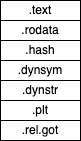
一個 segment 包含一個或多個 sections,不過 program header 並知道這個事實。下圖是一個典型的 text segment 範例。它包含了唯讀的 instructions 和 data。
下圖是一個典型的 data segment 範例。它包含了可寫的 data 和 instructions。

範例
我們可以利用 readelf -l 來讀取 program header。以下是 hello 的 program header。hello.o 沒有 program header,因為它不是一個 executable file。
$ readelf -l hello
Elf file type is EXEC (Executable file)
Entry point 0x400440
There are 9 program headers, starting at offset 64

Program Headers:
  Type           Offset             VirtAddr           PhysAddr
                 FileSiz            MemSiz              Flags  Align
  PHDR           0x0000000000000040 0x0000000000400040 0x0000000000400040
                 0x00000000000001f8 0x00000000000001f8  R E    8
  INTERP         0x0000000000000238 0x0000000000400238 0x0000000000400238
                 0x000000000000001c 0x000000000000001c  R      1
      [Requesting program interpreter: /lib64/ld-linux-x86-64.so.2]
  LOAD           0x0000000000000000 0x0000000000400000 0x0000000000400000
                 0x000000000000077c 0x000000000000077c  R E    200000
  LOAD           0x0000000000000e10 0x0000000000600e10 0x0000000000600e10
                 0x0000000000000228 0x0000000000000230  RW     200000
  DYNAMIC        0x0000000000000e28 0x0000000000600e28 0x0000000000600e28
                 0x00000000000001d0 0x00000000000001d0  RW     8
  NOTE           0x0000000000000254 0x0000000000400254 0x0000000000400254
                 0x0000000000000044 0x0000000000000044  R      4
  GNU_EH_FRAME   0x000000000000062c 0x000000000040062c 0x000000000040062c
                 0x000000000000003c 0x000000000000003c  R      4
  GNU_STACK      0x0000000000000000 0x0000000000000000 0x0000000000000000
                 0x0000000000000000 0x0000000000000000  RW     10
  GNU_RELRO      0x0000000000000e10 0x0000000000600e10 0x0000000000600e10
                 0x00000000000001f0 0x00000000000001f0  R      1

 Section to Segment mapping:
  Segment Sections...
   00
   01     .interp
   02     .interp .note.ABI-tag .note.gnu.build-id .gnu.hash .dynsym .dynstr .gnu.version .gnu.version_r .rela.dyn .rela.plt .init .plt .text .fini .rodata .eh_frame_hdr .eh_frame
   03     .init_array .fini_array .jcr .dynamic .got .got.plt .data .bss
   04     .dynamic
   05     .note.ABI-tag .note.gnu.build-id
   06     .eh_frame_hdr
   07
   08     .init_array .fini_array .jcr .dynamic .got
結語
本文章閱讀起來可能會覺得有點枯燥,因為它只是在介紹 ELF file。但是,了解 ELF file 是學習 linkers 的必經之路。
參考
- System V Application Binary Interface.
- John R. Levine, Linkers & Loaders.
- readelf, Linux manual page.


 Wayne
Wayne


